
Menu
-
Monopoly Go
-
FC 27
-
Diablo 4
-
Grow A Garden 2
-
MLB The Show 26
-
Call of Duty: MW4
-
College Football 27
-
ARC Raiders
-
Call of Duty: Black Ops 7
-
WoW Forever
-
GTA5
-
Path of Exile 2
-
MapleStory Classic World
-
Madden NFL 27
-
Aion 2
-
Helldivers 2
-
Wardogs
-
Path of Exile 1
-
NBA 2K27
-
RuneScape: Dragonwilds
-
Type://Soul
-
Battlefield 6
-
Bigo Live
-
Creatures of Sonaria
-
ROM: Golden Age
-
Aion Classic
-
Borderlands 4
-
No Rest for the Wicked
-
Growtopia
-
Garden Tower Defense
-
Seven Knights Re:birth
-
Plants vs Brainrots
-
Fish it
-
Highguard
-
Anime Fighters Simulator: Endless
-
Hytale
-
Arknights: Endfield
-
The Seven Deadly Sins: Origin
-
DonutSMP
-
Lineage Classic
-
The Midnight Walkers
-
Bee Swarm Simulator
-
Undecember
-
The Forge
-
Raven 2
-
Legend of YMIR
-
Anime Eternal
-
Anime Vanguards
-
Where Winds Meet
-
Ashes of Creation

How to Check Your GTA V Version in 2026 – And Why It Still Matters
Even now, in early 2026, with Rockstar dropping fresh content like mansion raids and odd jobs, Los Santos feels alive. But something that's tripped up a lot of players lately, including me a while back, is figuring out exactly which version of the game you're running. Especially on PC, where we've got this split between Legacy and Enhanced editions.
It hit me hard last year when the PC Enhanced version finally dropped. I upgraded, fired it up, and the ray-traced shadows bouncing off wet pavement after a rainstorm? Mind-blowing. But then some of my old mods wouldn't load, and I had to dig around to confirm what I was even playing. Turns out, knowing your version isn't just trivia—it's practical. It affects performance, mod compatibility, and even how new updates roll out.
These shots really drive it home. Look at the detail in character faces, the way light wraps around objects—Enhanced pulls ahead in ways that make the world feel deeper.
Why This Matters More Than Ever in 2026
Rockstar hasn't abandoned GTA V. Far from it. Just last month, Title Update 1.72 landed with a bunch of fixes, better DLSS support on Enhanced, and tweaks to load times. Before that, we got new odd jobs—those repeatable missions where you deliver goods or help with robberies—and the big one: a full Mission Creator letting players build their own jobs. Mansion raids added some high-stakes breaking-and-entering fun, too.
But here's the catch: some features, like certain Career Progress challenges or exclusive vehicle mods, play nicer on Enhanced editions (PS5, Xbox Series, and now PC). On the flip side, the modding scene—especially roleplay servers like FiveM—still leans heavily on Legacy because full support for Enhanced hasn't rolled out yet. I checked the forums recently; as of January, it's not there. If you're deep into scripting or custom maps, sticking with Legacy keeps things smooth.
From my own runs, switching to Enhanced gave me stable 60+ FPS with ray tracing on my RTX 4070, but it chewed more VRAM. Legacy ran lighter on older hardware. It's about what you value: raw visuals or flexibility.
How to confirm your GTA 5 game version
Since Xbox Series X/S and PS5 can also play Xbox One and PS4 versions of the game, please make sure you choose the right version to buy the GTA 5 Money or Accounts.
When you log in to your console and before opening GTA 5, which is clearly marked in the game tag as follows. 

If it shows Grand Theft Auto V (Xbox One), then you should choose the Xbox One version.
If it shows Grand Theft Auto Online (Xbox Series) xbox series x/s, then you should choose the Xbox Series version.
If it shows Grand Theft Auto V (PS5), then you should choose the PS5 version.
If it shows Grand Theft Auto V (PS4), then you should choose the PS4 version.
Step-by-Step: Checking Your Version on PC
This is the platform where it gets tricky, so let's make it reproducible. I've done these exact steps on my setup multiple times.
First, the quickest way: Launch the game into Story Mode. As it loads—the screen with the character art—look in the bottom-right corner. The version number flashes briefly, something like 1.72.XXXX. You have to be quick; it vanishes fast.
If you miss it, no sweat. Close the game, navigate to your install folder (usually C:\Program Files\Rockstar Games\Grand Theft Auto V), right-click GTAV.exe or GTA5.exe, go to Properties > Details tab. The Product version will tell you everything. Enhanced builds start higher and include ray tracing flags in the graphics menu.
Through the Rockstar Launcher: Open it, go to Settings > Grand Theft Auto V > View Installation. It sometimes lists Enhanced explicitly if you've migrated.
In-game confirmation: Pause > Settings > Graphics. If you see options for Ray Traced Global Illumination or advanced DLSS (like Frame Generation), you're on Enhanced. Legacy tops out at basic reflections.
I tested this across Steam, Epic, and Rockstar versions—works the same.
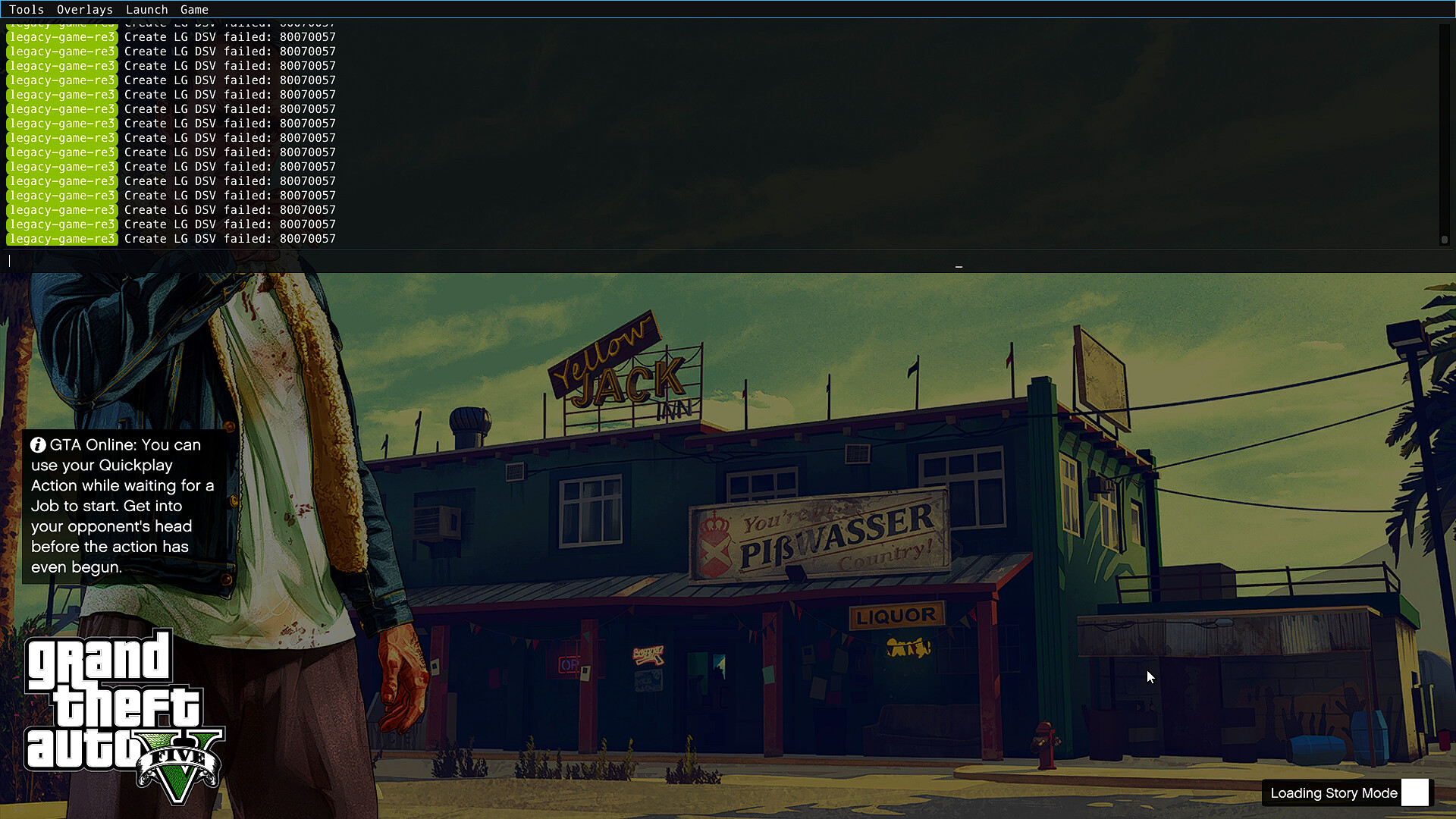
That's what the loading screen looks like when the version pops up.
Console Players: It's Simpler, But Still Worth Knowing
On PS5 or Xbox Series X|S, if you bought or upgraded digitally after 2022, you're almost certainly on Expanded & Enhanced. Check in system settings under game info—it'll say "PS5 Version" or similar. In-game, higher frame rates, faster loads, and haptic feedback are dead giveaways.
Older PS4/Xbox One discs or installs? That's the original build, no ray tracing or 4K upgrades.
I borrowed a friend's Series X recently and loaded my transferred save—the difference in draw distance while flying over the city was night and day.
Legacy vs. Enhanced: Breaking Down the Choices
Here's a quick table I put together from my testing and Rockstar's patch notes:
| Aspect | Legacy Version | Enhanced Version |
|---|---|---|
| Graphics Quality | Solid, but dated shadows and reflections | Ray-traced GI, better textures, HDR depth |
| Performance | Runs well on mid-range/older GPUs | Demands more power, but DLSS helps immensely |
| Mod Compatibility | Excellent—FiveM, script hooks all work | Limited; many mods break or need updates |
| Exclusive Features | Standard updates | Hao's Special Works, some GTA+ perks in garages |
| Load Times | Decent | Noticeably faster, especially session swaps |
I went Enhanced for single-player immersion—the city at night feels cinematic now. But for Online grinding with friends on custom servers, I keep a Legacy install handy. Dual installs are possible; Rockstar even added migration tools for saves.
Fresh GTA Online Content That's Keeping Us Hooked
Rockstar's weekly drops are consistent. Late January brought triple rewards on odd jobs, new Pfister vehicles, and bug fixes for wanted levels. The Mission Creator is huge—I've already played a few community heists that feel polished. It's proof they're still investing while we wait for whatever comes next.
Jumping In With a Boost
GTA Online's grind can feel eternal if you're starting fresh. Years of properties, vehicles, businesses—it's daunting. Some players skip the early slog by picking up pre-built GTA 5 accounts on sites like U4GM.com. They offer accounts with millions in cash, high ranks, and unlocked content. Just something to consider if you want to dive straight into the new raids and creators.
That said, I've always built mine from scratch. The satisfaction of that first big heist payout? Unmatched.
All told, GTA V in 2026 is still a masterpiece. Knowing your version just helps you squeeze every bit of life out of it. If you're unsure, try the steps above—they take two minutes. Los Santos isn't going anywhere.
